Sell Lemons hidden unlock
Sell Lemons Sewer Key Guide: Lever Order, Maze Route, and Rewards
Use this guide when the sewer door or sewer key is blocking your Sell Lemons Roblox progression. It explains what to prepare first, how to handle the blue button and lever sequence, how to think through the maze, and why exact triggers can change after updates.
- IntentHidden key route
- Best timeAfter stable upgrades
- RiskPatch-sensitive steps
- Next goalUFO key or rebirth
Fast answer
How to get the sewer key in Sell Lemons
The sewer key in Sell Lemons is best treated as a mid-game unlock, not as something a brand-new player should rush. Build a steady money loop first, then look for the blue button, the four-lever sequence, and the sewer maze path only after your current area stops offering obvious upgrade progress.
Current community routes generally describe the same pattern: press or activate the blue button when the relevant area is available, find four levers in the sewer route, use the maze carefully instead of sprinting blindly, then claim the sewer key reward once the final gate opens. Because Sell Lemons is a live Roblox experience, the safest guide is a checklist that helps you verify each gate rather than a single fragile coordinate list.
If a video route does not match your server, do not assume your account is bugged. Check whether the game updated, whether you missed a prior quest prompt, whether you joined a different server state, or whether you are trying the sewer path before the game expects you to.
Step-by-step route
Sewer key route checklist
Follow the route as a decision path. If one step is missing, backtrack to the previous gate before searching random corners.Stabilize income first
Buy the upgrades that keep lemon production, selling speed, capacity, or automation from stalling. The sewer route is easier when your core loop is not constantly short on cash.
Check the current area and prompts
Walk the area you have unlocked, read visible quest prompts, and look for the blue-button clue. Many failed sewer key attempts happen because the player follows a late-game clip before their own world has opened the same path.
Activate the blue button when it appears
When the blue button or related interaction is available, use it as the signal that the sewer route is active. If it is missing, continue progression instead of assuming the lever path is ready.
Find the four levers in order
Community guides commonly point to four lever interactions before the key route opens. Move slowly, verify each lever state, and avoid leaving the sewer path until you know whether the previous lever registered.
Navigate the maze by checkpoints
Use walls, turns, and visible landmarks as checkpoints. If you get turned around, return to the last confirmed lever or doorway instead of making random loops.
Claim the key and test the next gate
After the final gate opens, collect the sewer key and immediately confirm what it unlocks in your current build. If the next objective points toward UFO key, rebirth, or a new area, write that down before resetting or leaving the server.
Before you enter
Sewer key readiness checks
This table prevents the two common mistakes: entering too early and following outdated footage without checking your own game state.| Stage | What to check | Why it matters |
|---|---|---|
| Early upgrades | Income, capacity, and automation are no longer giving easy gains. | The sewer key is a hidden unlock; weak basics make every failed attempt slower. |
| Area state | The area with the blue-button clue or sewer access is actually open. | If the access point is not available, lever instructions will not match your server. |
| Lever route | Each lever interaction visibly registers before you move on. | Skipping one lever usually makes the final door look bugged. |
| Maze navigation | You can name the last doorway, turn, or lever you passed. | A checkpoint habit is more reliable than memorizing a clip from another patch. |
| After the key | You know whether the next target is UFO key, rebirth, or another unlock. | The key is part of progression, not the end of the route. |
Maze logic
How to avoid losing the sewer route
The maze is easier when you treat it like a sequence of confirmations instead of a speedrun.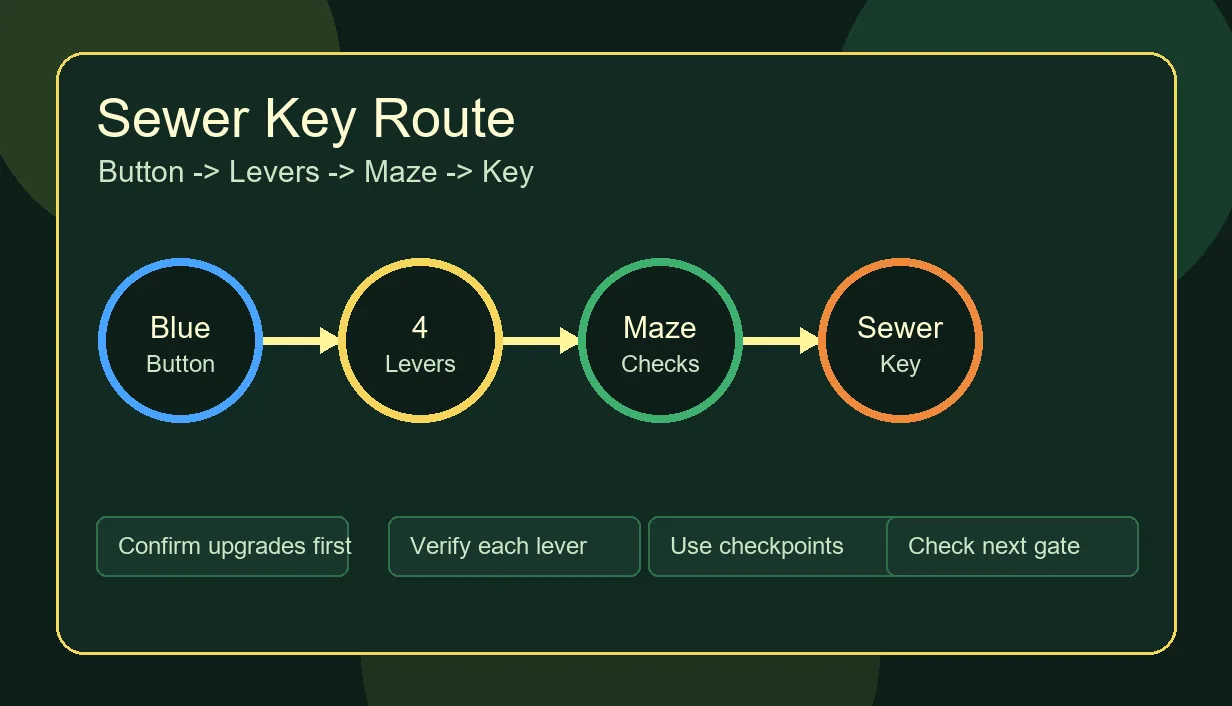
Use the blue button as your start marker
The blue button is the first strong signal that the sewer route is active in many guides. If it is not present, the safest move is to progress normally and return later.
Count levers, not minutes
Timer-based advice becomes outdated quickly. Count confirmed lever interactions and use the environment to orient yourself.
Reset only after checking prerequisites
If the final door will not open, first check the prior lever, quest prompt, and current server version. Rejoining may help only after you know the route itself was complete.
Separate sewer key from UFO key
Sewer key and UFO key searches often overlap, but they are different goals. Finish the sewer route before treating UFO clues as your next objective.
Troubleshooting
Common sewer key mistakes
Most failures come from timing, patch mismatch, or skipping a gate rather than from a permanent bug.Following an old video exactly
Use videos for visual orientation, but trust current in-game prompts first because Roblox experiences can change button locations, rewards, or requirements.
Running past a lever state
After each lever, pause long enough to confirm the interaction worked. If the route later fails, this makes backtracking much easier.
Resetting too early
Do not rebirth or leave the server just before checking what the sewer key unlocked. Confirm the next gate while the route is fresh.
Progression context
What to do after the sewer key
After you obtain the sewer key, treat the next objective as a progression branch. Some players should continue upgrading before chasing another hidden unlock, while others may be ready to investigate UFO key clues, rebirth timing, evolution requirements, or ascension planning.
The safest next step is to open the official Roblox experience, check current update notes or community clips, and compare them against this wiki route. Avoid fake downloads, copied games, and pages that promise a guaranteed key without explaining prerequisites.
- Official platform
- Roblox
- Developer group
- BloxByte Games
- Guide stance
- Fan-made, unaffiliated
- Unsafe paths
- No APKs or mirrors
FAQ